Watch Anywhere,Anytime
Your entertainment journey begins here. Download Lemon TV and unlock a world of unlimited streaming.
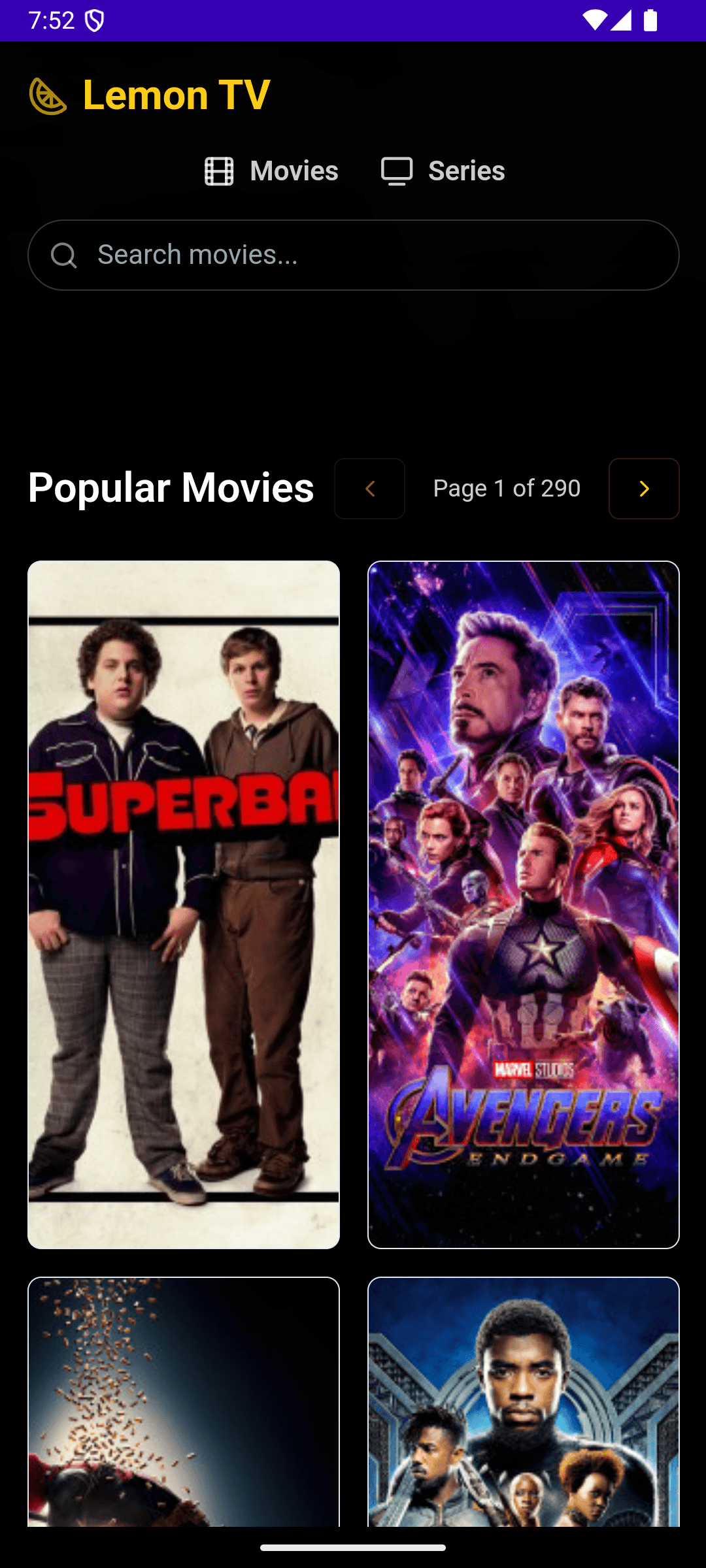
Available on Windows, macOS, Linux, and Android
Lemon TV is built as a native desktop and mobile application using Tauri, delivering fast performance and a small install footprint on every major platform. Download the right version for your device and start streaming in minutes.
Windows
Windows 10 and 11 (x64). Available as .exe installer or .msi package.
Download →macOS
macOS 11+ for Apple Silicon (M1/M2/M3) and Intel. Universal .dmg download.
Download →Linux
Ubuntu, Fedora, Arch, and more. AppImage, .deb, and .rpm packages.
Download →Android
Android 7.0+ via direct APK download. No Google Play Store required.
Download →Watch videos without ads
Lemon TV strips away the clutter of modern video platforms. No pre-roll ads, no banners, no pop-ups — just your content, playing instantly. Here are the features that make Lemon TV the best choice for focused, uninterrupted viewing.
Zero Ads, Zero Tracking
No advertisements of any kind. No tracking scripts, no analytics on your viewing habits. Your privacy is fully respected.
4K Streaming Quality
Watch content in crystal-clear quality up to 4K resolution. Hardware-accelerated playback ensures smooth performance even on modest machines.
Lightning-Fast Startup
Built with Tauri and Rust, Lemon TV launches in under 2 seconds, uses minimal RAM, and stays responsive even during intensive playback.
Built-in Subtitle Support
Load external SRT/VTT/ASS subtitle files or use embedded subtitles. Adjust font size, color, and position to your preference.
Cross-Platform Sync
The same familiar interface on Windows, macOS, Linux, and Android. Switch between devices without re-learning the app.
Auto-Updates Built In
Receive automatic update notifications for new releases. One-click updates keep you on the latest version with the newest features and fixes.
How to install Lemon TV
Getting started takes less than two minutes on any platform. Choose your operating system, download the installer, and follow the simple setup process below.
Choose Your Platform
Visit the download hub and select Windows, macOS, Linux, or Android. The page auto-detects your OS.
Download the Installer
Click the download link for your preferred format (.exe, .dmg, .AppImage, .deb, .rpm, or .apk).
Run the Setup
Open the downloaded file and follow the on-screen instructions. Installation completes in under a minute.
Start Watching
Launch Lemon TV, browse content, and start streaming instantly — no account registration required.
Open-source and regularly updated
Lemon TV is built in the open. Every line of code is publicly auditable, every release is signed, and every update is published with full changelogs. Trust is not something we ask for — it is something you can verify.
Open Source Code
The full source code is publicly available. Anyone can inspect, audit, or contribute to the codebase. No hidden telemetry, no hidden features.
Signed Releases
Every binary release includes a cryptographic signature file. Verify your download matches the official build before installing.
Active Development
Regular releases with new features, bug fixes, and security patches. Check the changelog to see what is being worked on.
Loved by thousands of users
See what people are saying about their experience with Lemon TV across all platforms.
“Honestly, the best video player I've used in years. No ads, just works perfectly. The 4K playback is incredibly smooth compared to others.”
Alex
Windows User
“I was tired of subscriptions for basic features. Lemon TV is a breath of fresh air. Fast, minimal, and open-source. Highly recommend!”
Sarah M.
macOS User
“Finally, a clean app for watching my media on the go without being bombarded by ads. The interface is intuitive and loads instantly.”
David K.
Android User
“It's so rare to find an app that supports Linux out of the box so well. The AppImage worked flawlessly on my Ubuntu setup.”
Elena R.
Linux User
“The built-in subtitle support is solid. I can load my own files seamlessly and it just syncs perfectly. It's now my daily driver for movies.”
Marcus T.
Home Theater Enthusiast
“Super easy to install on my Mac and plays literally everything I throw at it. The fact that it's completely free is mind-blowing.”
Jessica L.
macOS User
Common questions about Lemon TV
Answers to the most frequently asked questions about Lemon TV, covering installation, supported platforms, features, safety, and updates.
What is Lemon TV?
+
Lemon TV is a free, open-source cross-platform video application that lets you stream and watch videos without any ads. It is available for Windows, macOS, Linux, and Android devices.
Is Lemon TV really free?
+
Yes, Lemon TV is completely free to download and use. There are no subscription fees, hidden charges, or in-app purchases. The project is open-source and community-driven.
Which platforms does Lemon TV support?
+
Lemon TV supports Windows (x64), macOS (Apple Silicon and Intel), Linux (AppImage, .deb, .rpm), and Android (APK). This covers virtually all desktop and mobile platforms.
How do I install Lemon TV?
+
Visit the download page, choose your platform, and run the installer. On Windows, use the .exe or .msi installer. On macOS, open the .dmg file. On Linux, use the AppImage, .deb, or .rpm package. On Android, install the APK directly.
Is Lemon TV open source?
+
Yes, Lemon TV is fully open-source. The source code is publicly available and the project welcomes community contributions. Builds are signed and verifiable.
Does Lemon TV support subtitles?
+
Yes, Lemon TV has built-in subtitle support. You can load external subtitle files or use embedded subtitles in supported video formats for a better viewing experience.
How does Lemon TV handle updates?
+
Lemon TV includes a built-in auto-update mechanism. When a new version is available, the app notifies you and can update itself seamlessly without requiring a manual reinstall.
Is Lemon TV safe to download?
+
Yes, Lemon TV is safe. All release binaries are signed and you can verify downloads using the provided signature files. The open-source codebase means anyone can audit the code for security.
Ready to watch videos without ads?
Download Lemon TV for free on Windows, macOS, Linux, or Android. Installation takes less than two minutes. No account needed, no payment required, no ads — ever.
Version 0.16.0 · Free & open-source · All platforms supported